Exporting To Web Format
Most major web browsers rely on graphics being saved in either PNG, JPEG, or GIF format. Other formats are available, but browser support is limited.
What this means for those of us who build web pages, is that we have to make sure we save our images in the right format. As long as your image is in PNG, GIF or JPEG format it should be displayable, however, your images will look much better if you know which format to choose.
- JPEG
-
JPEG is a format that suits images with lots of colors such as photos.
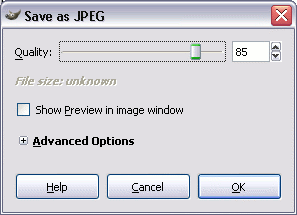
JPEG is a method of lossy compression. This means that it loses quality, depending on how much compression you give it. You can adjust the level of compression when you save it. Therefore, you can strike a good balance between image quality and file size.
One of the important thing about graphics on the web is keeping the file size down, while maintaining acceptable quality.
- GIF
-
GIF is better for images with less colors and especially if they're flat colors. Therefore, images are great for logos, cartoons, fancy text etc.
GIFs are animatable — so they can be used to create small animations and low-resolution movies.
For an example of GIF and JPEG usage, check out GIF vs JPEG.
- PNG
-
PNG is a raster graphics file format that supports lossless data compression. It supports Alpha Transparency.
PNG was designed as a replacement for the GIF format. PNG has better compression and more features than GIF (although PNG doesn't support animations).
When this tutorial was first written, PNG was a relatively new format, but with very little browser support.
It is now supported by all major browsers, including Safari, Chrome, Firefox, Opera, Camino, and Internet Explorer (although, Internet Explorer 7 & 8 are reported to have numerous issues with PNG format).
You could use a PNG anywhere on this tutorial that I recommend using GIF. However, check the file size. In some cases it will be bigger — much bigger. In other cases, it will be lower. Generally, the file size of a PNG will be smaller than a GIF when the image is very small with a small number of colors.
In other words, PNG is more suitable for small icons, line drawings, text, etc.
Also, if true-color imaging and alpha transparency are required, use PNG.
How to Export to GIF/JPEG Format
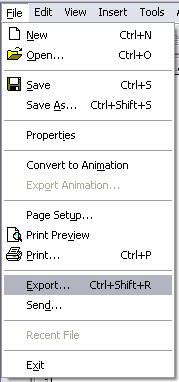
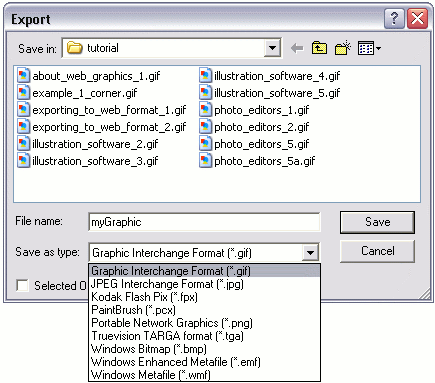
Graphics software usually provide you with an "Export" option from the file menu. This option allows you to export the image to a different format, for example GIF format.
- Select "Export" from the file menu:
- Name your image, select a format, then click "Save":
"Save As" Web Format
Some graphics software, especially photo editors, allow you to "Save As" straight to a web format.
- Select "Save" from the file menu:
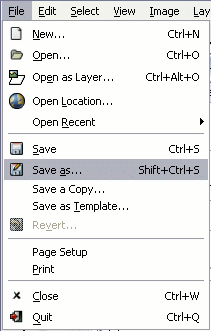
- Name the image. This example uses a photo editor called "GIMP". GIMP allows you to set the format by giving it the appropriate file extension (.gif for GIF and .jpg for JPEG):
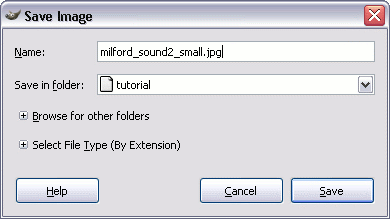
- Further options. In this case, we're saving in JPEG format. When saving as JPEG, we get the option of choosing its quality. The higher the quality the larger the file (the longer the download time):