
Animated GIFs With GIMP
GIMP provides a couple of options for creating animated GIFs.
What Is An Animated GIF?
An animated GIF is simply an animated image, saved as a GIF. The animation occurs due to multiple "frames" being present within the image. Each frame represents a different image within the image. When the image is displayed, it runs through each frame, one after the other. This can occur quickly or slowly (as specified by the designer).
Here's an example of an animated GIF:
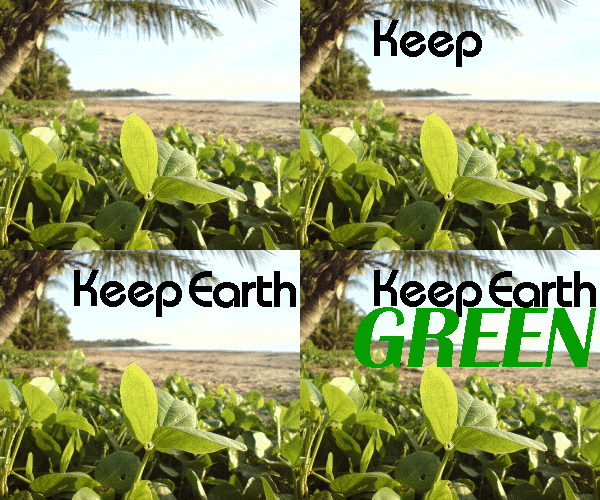
While most browsers support animated GIFs, some don't. If you can't see the animation in this example, your browser may not support animated GIFs.
In the above example, there are four frames.
- The first frame is simply a photo
- In the second frame, the word "Keep" is added
- In the third frame, the word "Earth" is added
- In the fourth frame, the word "GREEN" is added
Once the animation reaches the end (after the word GREEN), it starts again. This is called a "loop" — as it loops over and over the same animation. If it wasn't looped, it would stop at the fourth frame.
Creating Animations With GIMP
GIMP provides a couple of ways of creating animated GIFs.
- Using Script-Fu
-
Script-Fu is GIMP's scripting extension. Script-Fu is similar to Macros in Windows, but more powerful. It is a scripting language that allows you to automate frequent, or complicated tasks.
You can create your own scripts or use the ones already installed with GIMP. GIMP comes with a bunch of pre-written animation scripts that you can apply to any image as needed.
- Using Layers
-
Layers provide you with more options for your animated GIFs. Each layer becomes a different frame in your animation.
Many GIMP users don't actually realize that they can use GIMP to create animated GIFs.
In the next two lessons, you'll see how easy creating animated GIFs can be!