
About Layers in GIMP
Layers allow you to stack images on top of each other, while all remain within a single image.
Layers are an important part of creating images in GIMP. If you're familiar with Adobe Photoshop, you'll know what I mean. Layers provide you with the ability to separate different parts of your image, so that you can manipulate each part separately to the rest of your image.
The Benefits of Layers
Layers give you more control and flexibility over your image compositions.
Layers enable you to stack images on top of other images — all within the same image. Therefore, you can have multiple layers of images, stacked on top of each other.
But most importantly, each layer can be transparent or semi-transparent as required. Therefore, despite having layers on top of others, you are still able to see the other layers beneath them.
If we didn't have layers, our life would be so much more difficult. Layers enable you to add and remove parts to your image without affecting the rest of the image. They help you experiment with different effects. If you find that something doesn't work, you can just delete the layer (or hide it) - the rest of the image is still intact.
Example of Layers
Let's take the following image:

This image contains three layers: one for the background, one for the oval shape, and one for the text.
Here's what the image looks like when editing it in GIMP. In this screenshot, I have the layers dialog box open. Notice the three layers in the dialog box:
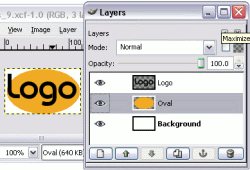
If we hide the middle layer, we get this:

If we hide the top layer, we get this:

If we hide both the top and middle layers, we'd get a blank white image (because the background is white).
One of the great things about layers is that you can treat each layer differently. For example, on one layer, you could change the transparency level, on another layer, you could paste an image, and on another, you could write text. The possibilities are endless. And the end result, is a more interesting image.
You can see why layers can be a powerful tool in creating image compositions. The above example uses a very basic image, but just imagine the possibilities.
The next lesson shows how layers can be used on a slightly more complex image.