|
Web Graphics Home
GIMP TutorialAbout GIMPDownload GIMP Getting Started Creating Your First Image Saving Images File Formats Selection Tools Adding Color Resizing Images About Layers Example of Layers Creating Layers Adding Text Filters Animated GIFs Animated GIFs: Script-Fu Animated GIFs: Layers Path Tool Drawing Paths Summary Web Graphics Home Web Graphics TutorialAbout Web GraphicsGraphics Software Photo Editors Illustration Software Exporting to Web Format Uploading Images to the Web Embedding Images into a Web Page How to use a Scanner Free Web GraphicsFree IconsFree Logos Free Clip Art Free Background Patterns
Sponsored Links
$1.99 Domain Names
With every new non-domain purchase thru ZappyHost, you get a domain name for only $1.99. |
GIMP (GNU Image Manipulation Program)What Is The GIMP?GIMP (GNU Image Manipulation Program, formerly General Image Manipulation Program) is a free graphics editing package. It is typically used to do things like:
It's kind of like a free version of Adobe Photoshop. What Does The GIMP Look Like?Here's what the GIMP looks like in normal editing view:
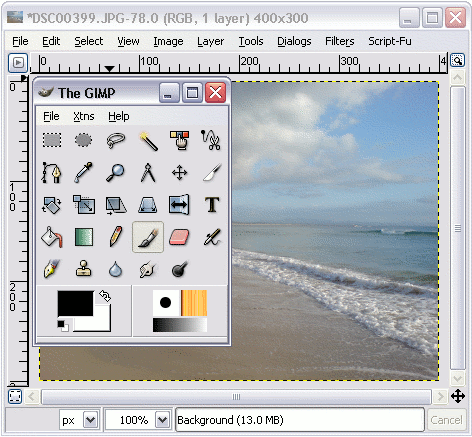
GIMP TutorialLearn how to use the GIMP with this GIMP tutorial. Download The GIMPAt the time of writing, GIMP is available for UNIX, Windows, and Mac computers. You can download GIMP from the GIMP website: |
Sponsored Links
Need Website Content?
Get unique, quality digital content for your website.
|