
XPath String Functions
XPath includes a number of string functions.
String Functions
Here's a list of string functions you might find useful for your XPath expressions:
| Functions | Description |
|---|---|
| starts-with(string1, string2) | Returns true if the first string starts with the second string. |
| contains(string1, string2) | Returns true if the first string contains the second string. |
| substring(stringoffsetlength) | Returns a section of the string. The section starts at offset (which is a number), and is as long as the value provided at length (also a number). |
| substring-before(string1, string2) | Returns the part of string1 up until the first occurence of string2. |
| substring-after(string1, string2) | Returns the part of string1 after the first occurence of string2. |
| string-length(string) | Returns the length of string (i.e. the number of characters). |
| normalize-space(string) | Trims the leading and trailing space from string. Also replaces consecutive occurrences of white space with a single space. |
| translate(string1, string2, string3) | Returns string1 after any matching characters in string2 have been replaced by the characters in string3. |
| concat(string1, string2, ...) | Concatenates all strings (i.e. joins them together). |
| format-number(number1, string1, string2) | Returns a formatted string version of number1 after applying string1 as a format string. string2 is an optional locale string. |
Usage Example
The Source XML File
We'll use the following XML file, which contains a list of vegetables:
The Requirement
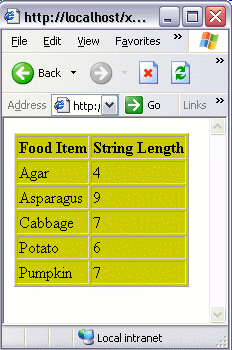
Let's display the vegetable names in one column, and the string length of the vegetable name in another. Like this:
The Solution
We could use the string-length() function in our XSL file to return the length of the string: