
XML and XSL
XSL is a powerful language for applying styles to XML documents.
In the previous lesson, we used CSS to apply styles to the contents of our XML document. Applying styles improved the look of our document when viewing it with a browser.
XML also has its own styles language - XSL. XSL stands for Extensible Styles Language and is a very powerful language for applying styles to XML documents. XSL has two parts — a formatting language and a transformation language.
The formatting language allows you to apply styles similar to what CSS does. Browser support for the XSL formatting language is limited at this stage.
The transformation language is known as XSLT (XSL Transformations). XSLT allows you to transform your XML document into another form. For example, you could use XSLT to dynamically output some (or all) of the contents of your XML file into an HTML document containing other content.
XSLT Example
Using our previous XML example, imagine if we wanted to add a heading and some text to the top of the document when we output our XML document. Something like this:
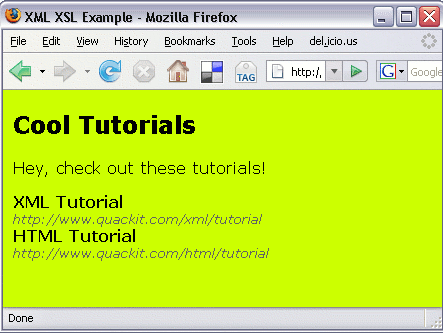
The only problem is, the heading and the text isn't in the XML file. Well, this is where XSLT comes in. Using XSLT, all we need to do is create a style sheet that transforms the XML into HTML and adds the heading/text.
How to Do This?
Instead of linking to a CSS file, we will link to a XSL file.
-
Create an XML file with the following content and save it.
-
Create a file with the following content and save it as tutorials.xsl into the same directory as the XML file.
I don't expect you to understand all this code just yet. I'll be explaining that later on — I've written a whole section on XSLT. But, it does give you an hint of what's to come in this tutorial. In the above XSL file, I'm using XSLT and XPath — both of which are explained later in this tutorial.