
CSS font-size-adjust
The CSS font-size-adjust property is used for scaling the x-height of a font.
The font-size-adjust property can be useful, because, for a given size, some fonts are harder to read than others. This can become an issue particularly if your first-choice font is unavailable, and the next available font has a different aspect ratio (potentially making the fallback font harder to read). You can use font-size-adjust to adjust the x-height to give the fallback font the same x-height as your first choice font, thus making the backup font more legible.
How font-size-adjust Works
Here's an example to demonstrate how font-size-adjust works. This example compares two fonts of different x-heights, and shows how one can be "adjusted" so that it matches the x-height of the other font.
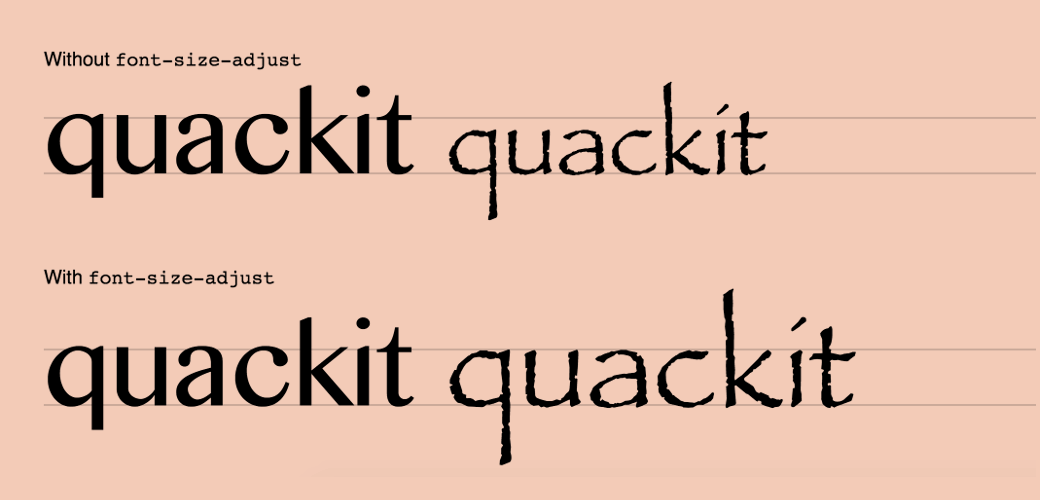
All of the above text has a font-size of 100px. The text on the left uses a font called "Bangla MN" which has an aspect value of 0.569. The text on the right uses a font called "Papyrus", which has an aspect value of 0.447. This results in smaller looking text. However, the bottom line has had font-size-adjust: 0.569 applied to it (the aspect ratio of our first choice font). This causes the font on the bottom right to have its size adjusted based on the aspect ratio specified.
A Paragraph Example
Here's an example that demonstrates how your fallback font could inadvertently cause your website to become unreadable.
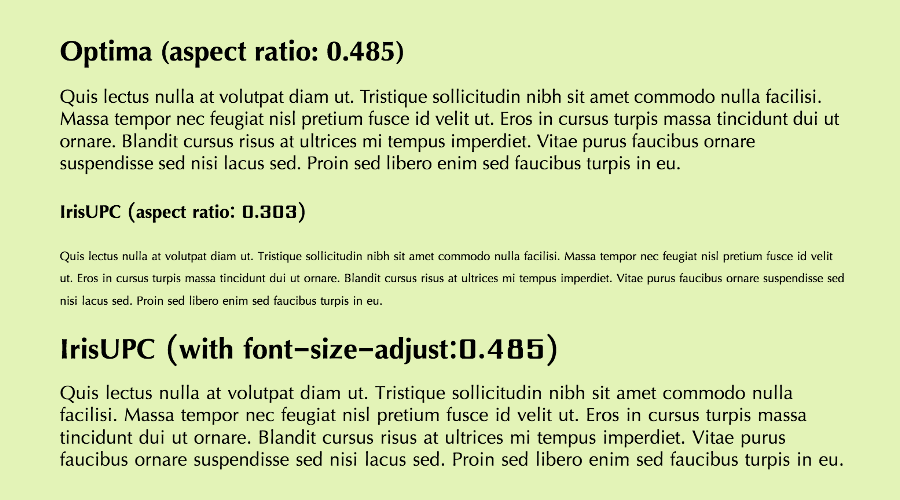
Our first choice font (Optima) has an aspect ratio of 0.485. Our second choice font, while a very similar looking font, has an aspect ratio of only 0.303. This causes the text to become virtually unreadable if it becomes the used font. Fortunately, by using font-size-adjust: 0.485, the second choice font increases in size and becomes much more readable.
Here's the code used to generate this example.
Syntax
Possible Values
none- Specifies that the font's x-height is not preserved.
- number
-
This value refers to the aspect number of the first choice font. The available fonts will be scaled according to the following formula:
c = ( a / a' ) s
where:
s  =  font-size value
a  =  aspect value as specified by the 'font-size-adjust' property
a' =  aspect value of actual font
c  =  adjusted font-size to use
For example, if 12px Georgia (with an aspect value of 0.50) was unavailable and an available font had an aspect value of 0.40, the font-size of the substitute would be 12 * (0.50/0.40) = 15px.
In addition, all CSS properties also accept the following CSS-wide keyword values as the sole component of their property value:
initial- Represents the value specified as the property's initial value.
inherit- Represents the computed value of the property on the element's parent.
unset- This value acts as either
inheritorinitial, depending on whether the property is inherited or not. In other words, it sets all properties to their parent value if they are inheritable or to their initial value if not inheritable.
General Information
- Initial Value
none- Applies To
- All elements
- Inherited?
- Yes
- Media
- Visual
- Animatable
- Yes, as number (see example)
Example Code
Official Specifications
- CSS Fonts Module Level 3 (W3C Candidate Recommendation 3 October 2013)
- CSS Level 2 (W3C Recommendation 12-May-1998)
Note that the font-size-adjust property was initially introduced in CSS2, removed in CSS2.1, but then re-introduced in CSS3.
Browser Support
The following table provided by Caniuse.com shows the level of browser support for this feature.