
SQL Server - Server Roles
When creating a new user login in SQL Server, you get the option of assigning the login one or more server roles.
Server roles (not to be confused with database roles) are available for various database administration tasks. Not everyone should be assigned to a server role. In fact, only advanced users such as database administrators should be assigned a server role.
Accessing the Server Roles
To access the server roles in SQL Server Management Studio, expand the Security folder:
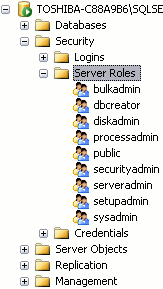
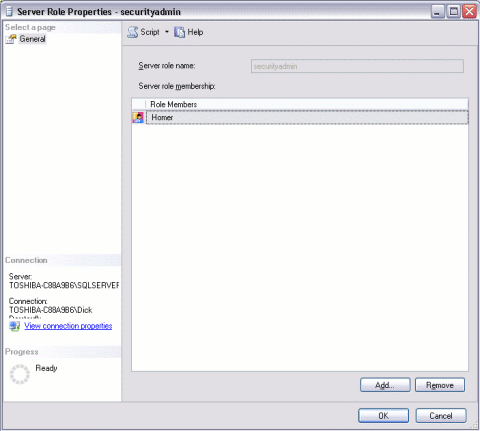
You view the properties of a server role by right clicking on it. You can then add users to the server role by clicking Add. In the screenshot below, Homer has been added to the securityadmin role.
Explanation of Server Roles
Here's an explanation of the server roles defined in SQL Server 2008 during setup:
| Server Role | Description |
|---|---|
| sysadmin | Can perform any task in SQL Server. |
| serveradmin | Can set server-wide configuration options, can shut down the server. |
| setupadmin | Can manage linked servers and startup procedures. |
| securityadmin | Can manage logins and database permissions, read logs, change passwords. |
| processadmin | Can manage processes running in SQL Server. |
| dbcreator | Can create, alter, and drop databases. |
| diskadmin | Can manage disk files. |
| bulkadmin | Can execute BULK INSERT statements. |
| public | Every SQL Server user account belongs to this server role. When a server principal has not been granted or denied specific permissions on a securable object, the user inherits the permissions granted to public on that object. Only assign public permissions on an object when you want the object to be available to all users. |
As you can see, some of these roles allow very specific tasks to be performed. If you don't have many technical users, it's likely that you'll only use one or two of these roles (including sysadmin).