
SQL Server - Adding Data
In the previous lesson, we created a new table in our database. We now have a database table, columns and all, but with no data.
Editing Table Rows
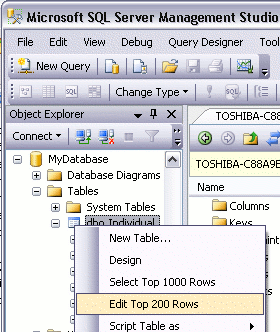
We can use the "Edit Top 200 Rows" option to add data to our table.
- To use this option, right click on the table you wish to open, and select "Edit Top 200 Rows":
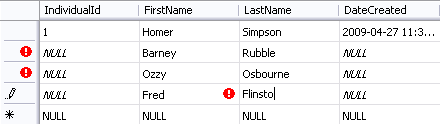
- You can now start entering the data directly into your table.
Note that you don't need to enter data into the IndividualId and DateCreated columns. This is because the they will be populated automatically (remember, we set IndividualId to "Is Identity" and DateCreated to "(GetDate())")
Disadvantages of Entering Data Directly to your Table
The above method is fine if you only have a small amount of data to enter or update. If you have a lot of data to enter, this could become very tedious. Also, if you have multiple environments (for example, a development environment, staging environment, and production environment), with duplicate databases configured in each environment, you will need to re-enter the same data into each environment.
When you're first learning SQL Server, this may not be a major concern. However, in an environment such as described, entering data directly into the table becomes quite inefficient.
A Better Method - SQL Scripts
In most cases, you will probably find it more efficient to write a SQL script. Using a script enables you to re-enter the data as many times as you like. If you need to rebuild your database for any reason, you can simply run your script to enter the data. If you have multiple environments, once again you can run your script against each environment.
Once you get used to writing and running scripts, you will probably find it quicker than entering data directly into the table.
Database Driven Websites
When you create a database driven website, you actually write SQL scripts to insert data into the database. You also use SQL scripts to read data, update data, and delete data. These SQL scripts can be placed directly into your website code (PHP, ColdFusion etc), or they can be stored in the database as Stored Procedures or Views.
In the next lesson, we will look at how to write and execute SQL scripts within SQL Server.